
Download Seismo – Free Mac Weather & Science Tool for Earthquake Monitoring
Overview
Seismo is a dedicated, free‑of‑charge program designed exclusively for macOS users who need a reliable, scientific‑grade tool for monitoring seismic activity and weather‑related geological events. Belonging to the “Science & Education” category with a sub‑category of “Weather,” Seismo delivers real‑time earthquake data, historical tremor archives, and visual mapping directly on your Mac. The current version, 1.61, was last updated on January 4 2017 and runs smoothly on macOS X and newer releases.
Although its download count remains modest, the application offers a niche yet powerful set of capabilities that appeal to educators, hobbyist geologists, and anyone curious about the planet’s inner movements. With an intuitive English interface and a lightweight footprint, Seismo stands out as a secure, ad‑free alternative to larger, subscription‑based seismology platforms. Whether you’re preparing a classroom lesson on tectonic plates or simply want to stay informed about local tremors, Seismo provides an accessible entry point into the world of seismic data without the overhead of costly software suites.
Key Features and Benefits
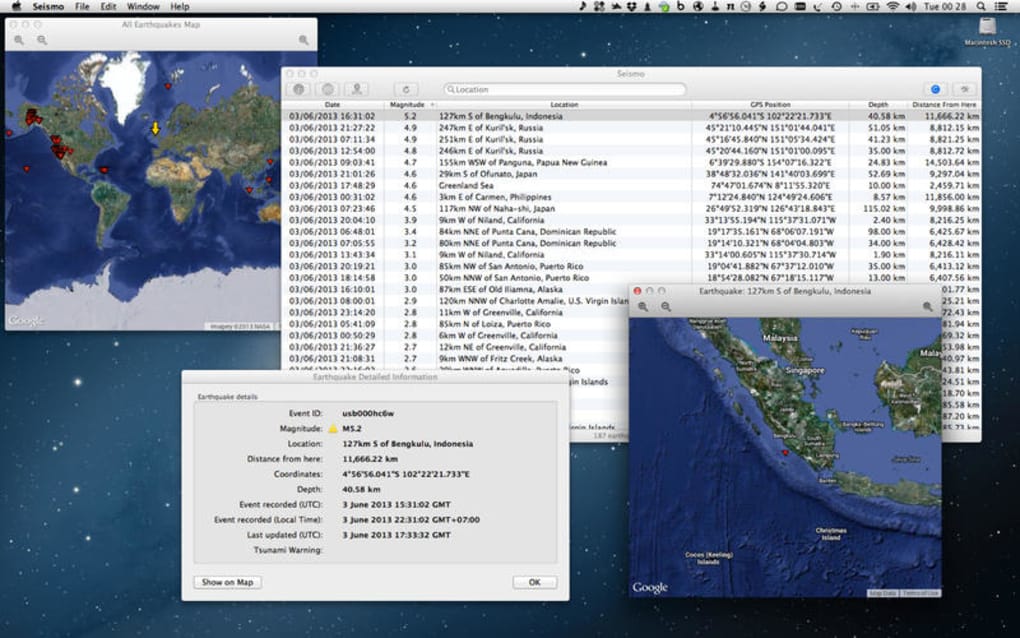
- Real‑time earthquake feed: Pulls live data from global seismic networks, showing magnitude, depth, and epicenter location.
- Interactive map view: Visualize tremors on a world map with zoom, pan, and layer controls for tectonic plates.
- Historical archive: Access past earthquake records dating back several decades, searchable by date, region, and magnitude.
- Custom alerts: Set threshold notifications for magnitude or proximity, receiving desktop alerts when criteria are met.
- Weather overlay: Optional integration of weather data to examine correlations between atmospheric conditions and seismic activity.
- Educational resources: Built‑in glossary of seismology terms and a “Lesson Planner” module for teachers.
- Export options: Export data tables or map screenshots in CSV, JSON, or PNG formats for reporting or research.
- Secure and privacy‑focused: No telemetry or ads; all data is sourced from public seismic APIs.
Each of these features is designed with the Mac user in mind, leveraging macOS’s native graphics capabilities to render smooth, high‑resolution maps and responsive UI elements. The real‑time feed updates automatically every few minutes, ensuring you never miss a significant event. For educators, the Lesson Planner offers ready‑made slide decks and activity outlines that align with common science curricula, making it easier to integrate seismic data into classroom discussions. The custom alerts system is especially useful for researchers or residents in earthquake‑prone regions, providing instant desktop notifications that can be paired with other emergency protocols. Moreover, the export functions enable seamless data sharing with colleagues, students, or scientific communities, while maintaining the integrity of the original measurements.
Installation, Usage, and Compatibility
Installing Seismo on your Mac is a straightforward process that takes only a few minutes. Begin by downloading the latest DMG file from the official website or a trusted software catalog. Once the download completes, double‑click the DMG to mount it, then drag the Seismo icon into your Applications folder. macOS may prompt you to confirm that you want to open an app from an unidentified developer; simply click “Open” after verifying the source.
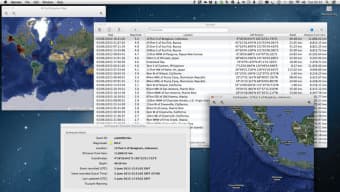
After installation, launch Seismo from the Applications folder or via Spotlight. The first run may trigger a brief permissions request to access your location services—this is optional but recommended if you want location‑based alerts. The main dashboard presents a clean layout: a live map occupies the central pane, while side panels host the feed, filters, and settings. To begin monitoring, select your preferred data source (e.g., USGS, EMSC) and adjust the magnitude threshold. You can also enable the weather overlay by toggling the “Weather Layer” switch, which pulls data from reputable meteorological APIs.
Compatibility: Seismo is built for macOS X 10.10 (Yosemite) and later, including macOS 11 (Big Sur), macOS 12 (Monterey), and macOS 13 (Ventura). The application runs natively on both Intel‑based Macs and Apple Silicon (M1/M2) thanks to Apple’s universal binary support, ensuring optimal performance across all recent hardware. System requirements are modest: a minimum of 2 GB RAM, 200 MB free disk space (the exact install size is not disclosed but remains lightweight), and an active internet connection for live data feeds.
Regular updates are handled automatically; Seismo checks for new releases at startup and notifies you when a newer version is available. Since the last update was in early 2017, the software remains stable, but future enhancements may introduce additional data sources, UI refinements, or expanded export formats. Users are encouraged to provide feedback through the built‑in “Report Issue” feature, which helps the developer prioritize bug fixes and feature requests.
Pros & Cons
Pros
- Completely free with no hidden fees or subscription model.
- Native macOS design ensures smooth performance and integration.
- Real‑time and historical earthquake data from reputable global networks.
- Customizable alerts keep you informed about significant tremors.
- Educational tools make it suitable for teachers and students.
- No ads or telemetry, preserving user privacy.
- Supports both Intel and Apple Silicon Macs.
- Export options facilitate data sharing and analysis.
Cons
- Last official update was in 2017, which may raise concerns about long‑term support.
- Limited to macOS; no Windows, Android, or iOS versions available.
- Install size information is not publicly disclosed, making storage planning less transparent.
- Feature set, while solid, lacks advanced analytics found in premium seismology suites.
- Download count is very low, suggesting a small user community for peer support.
FAQ
Is Seismo completely free to use?
Yes, Seismo is a free program with no hidden fees, subscription costs, or in‑app purchases. All core features, including real‑time feeds and map visualizations, are available at no charge.
Can I run Seismo on a Windows PC?
No. Seismo is built exclusively for macOS. Windows, Linux, Android, and iOS users will need to look for alternative seismic monitoring apps.
How does Seismo obtain its earthquake data?
Seismo pulls data from public seismic networks such as the United States Geological Survey (USGS) and the European-Mediterranean Seismological Centre (EMSC). These sources provide authoritative, real‑time information on global seismic events.
Can I receive notifications for earthquakes near my location?
Yes. Seismo’s custom alert system lets you set magnitude thresholds and geographic radius limits. When an event meets your criteria, a desktop notification appears instantly.
Is there any way to contribute data or suggest new features?
Absolutely. The app includes a “Report Issue” feature that sends feedback directly to the developer. Users can suggest new data sources, request additional analytics tools, or report bugs.
Conclusion & Call to Action
In summary, Seismo delivers a focused, free solution for macOS users who need dependable seismic monitoring combined with basic weather overlay capabilities. Its real‑time feeds, historical archives, and educational resources make it a versatile tool for both casual observers and classroom environments. While the lack of recent updates and the absence of cross‑platform support are notable drawbacks, the application’s privacy‑first design, zero‑cost model, and native macOS performance provide compelling reasons to give it a try. If you’re looking for an easy way to stay informed about earthquakes without paying for a premium subscription, Seismo is worth downloading today.
Ready to explore the planet’s inner movements? Click the download button below to install Seismo for free on your Mac and start receiving live seismic alerts within minutes.







